FlyMSG: Write Emails and Posts Faster with AI
Need to write professional emails faster? FlyMSG lets you build, organize, and deploy personalized email templates in seconds across Gmail, Outlook, and any web platform.
What Is FlyMSG?
FlyMSG is a browser-based productivity app that combines an AI writer, text expander, email template builder, AI post generator, and LinkedIn commenting assistant into one tool. Sales reps, customer service agents, recruiters, and business owners often send dozens of similar messages every day, things like introductions, follow-ups, and answers to common questions. Most people store these in scattered Word docs, draft folders, or try to remember them, which wastes minutes per message on hunting, copying, and pasting.
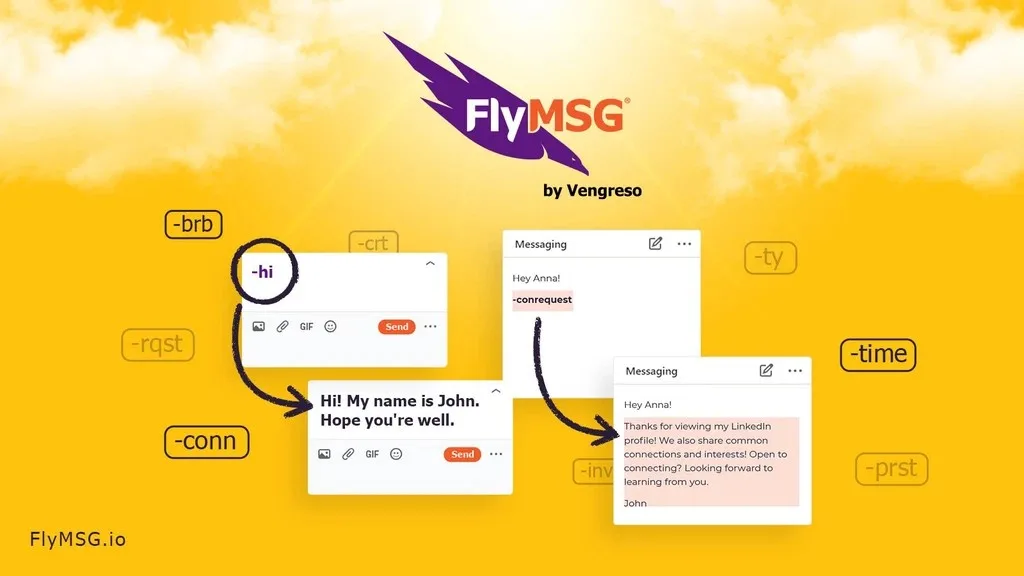
FlyMSG solves this by letting you build unlimited email templates and text snippets, called FlyCuts, with full formatting, personalization fields, and media inserts, all stored in the cloud and organized by category. A short keyboard shortcut expands any template instantly inside Gmail, Outlook, HubSpot, Salesforce, LinkedIn, or any web-based platform. It works as a browser extension for Chrome and Microsoft Edge, so your templates follow you wherever you type online.
How FlyMSG Works
Email Template Creation and Text Expansion
Build rich, formatted email templates once and reuse them anywhere with a simple keyboard shortcut. Unlike basic text expanders that only handle plain snippets, FlyMSG preserves formatting, images, and complex structures, so what you type stays consistent with your brand voice. This turns a five-minute composition task into something you finish in a few seconds.
FlyPlates Template Library
FlyMSG includes over 400 pre-built FlyPlates, or messaging templates, for common scenarios like sales outreach, customer replies, and InMail messages. You can use them as-is or customize them, then save your own versions as FlyCuts for future use. Everything is organized by category and subcategory so nothing gets lost in a sent folder or random document.
AI Writing Assistant
FlyMSG acts as a personal AI writer that helps you draft messages, forms, and social content in seconds instead of staring at a blank page. It autopopulates fields, emails, and Slack messages based on short prompts or existing snippets. This reduces the time spent second-guessing wording on repetitive communication.
FlyEngage for LinkedIn Commenting
FlyEngage is a LinkedIn AI commenting tool built into FlyMSG that generates relevant comment suggestions directly inside your LinkedIn or LinkedIn Sales Navigator feed. It supports 39 languages and can turn a comment that used to take 6 to 12 minutes to write into one that takes under 10 seconds. You can also save favorite prompts as FlyCuts and reuse them across any AI prompt box.
FlyPosts AI Post Generator
FlyPosts is a social media AI post generator that helps you create LinkedIn posts right from LinkedIn’s Start a Post function. It offers pre-defined prompts on common topics and lets you write custom prompts for your own thought leadership content. This is separate from FlyEngage, which focuses on comments rather than original posts.
Customer Reviews
FlyMSG holds a 4.52-star rating from 82 reviews. Customers frequently mention efficient text expansion, useful AI writing capabilities, and real time savings as strengths, along with smooth integration and responsive customer support. Some reviewers noted occasional issues with grammar and spelling fixes and mentioned the tool can be memory-intensive, but overall feedback trends positive.
Who Should Use It
- Sales reps who send similar prospecting and follow-up emails every day and want a consistent, quickly deployed template library
- Customer service and success teams handling high volumes of repetitive inquiries who need fast, formatted responses across email and chat tools
- Recruiters and HR professionals coordinating candidate communications who want reusable templates for outreach, scheduling, and updates
- Business owners and marketers who want to grow LinkedIn engagement through AI-assisted commenting and post creation without spending hours writing from scratch
Things to Know Before Buying
- FlyMSG works as a browser extension, so it is limited to platforms accessible through Chrome or Microsoft Edge rather than native desktop applications
- AI prompt usage is capped at a set number per day rather than unlimited, so heavy AI-writing use should be planned around that limit
- The tool is most useful for people who compose repetitive messages regularly; casual users may not see the same time savings as high-volume communicators
Frequently Asked Questions
Does FlyMSG work with Gmail and Outlook?
Yes. FlyMSG works inside Gmail, Outlook, and other web-based email clients, along with platforms like HubSpot, Salesforce, and LinkedIn, through its browser extension.
Can I keep rich formatting in my templates?
Yes. FlyMSG preserves formatting, images, and layout in your email templates and FlyCuts, unlike basic text expanders that only handle plain text.
Is FlyEngage the same as FlyPosts?
No. FlyEngage generates AI-assisted comments on LinkedIn posts, while FlyPosts helps you create original LinkedIn posts using AI prompts.
How much does FlyMSG cost?
For current pricing and what is included, see the Lifetime Deal Details page.