Measuremate: Automate GA4, GTM & BigQuery Tracking
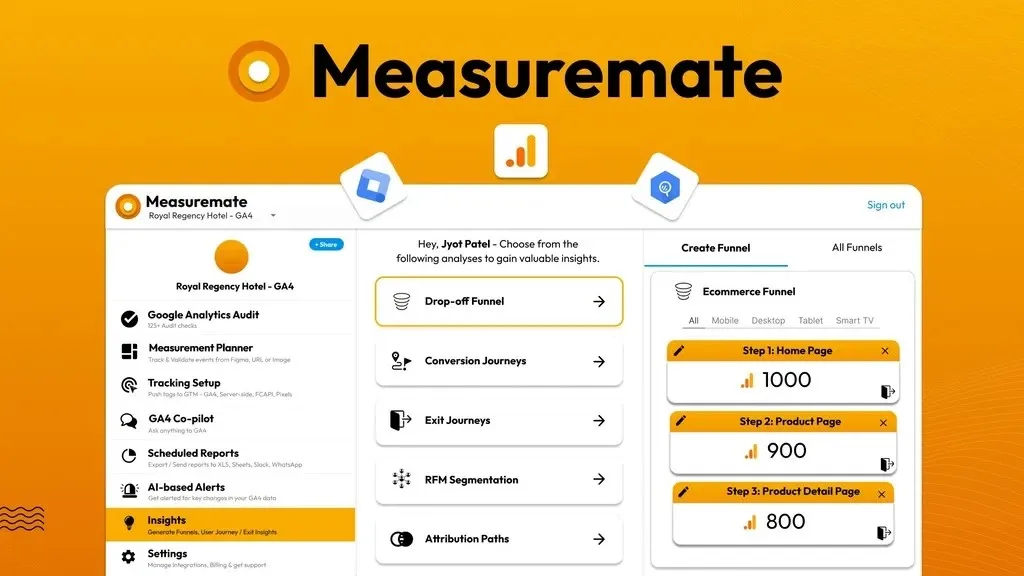
Measuremate brings GA4, GTM, BigQuery, and behavioral tools like Hotjar and Microsoft Clarity into a single no-code workflow. Stop stitching together separate tools to understand what your data really means.
What Is Measuremate?
Measuremate is a no-code platform that unifies GA4, Google Tag Manager, BigQuery, and behavioral tracking tools into one workspace. Marketers typically rely on GA4 for quantitative metrics while running Hotjar or Microsoft Clarity separately for session recordings and heatmaps, which means duplicated tagging work and no clear link between what the numbers show and what actual users are doing on the page.
Instead of treating behavioral recording as an afterthought, Measuremate builds Hotjar and Microsoft Clarity setup directly into its tracking and setup module. That means session recordings and heatmaps get deployed in the same one-click workflow as GA4 events, ad pixels, and server-side tags, so quantitative and qualitative data come from one coordinated plan instead of two disconnected systems.
How Measuremate Works
GA4 Audit
Measuremate runs a one-click audit with more than 125 checks across six categories, including basic GA4 configuration, data privacy and access, tracking accuracy, integrations, event coverage, and data quality. This catches misconfigurations and gaps before they distort your reporting.
Tracking and Setup with Behavioral Context
Access more than 100 pre-tested GTM templates to push tags instantly, covering GA4 pageviews, custom and ecommerce events, and server-side tagging. This same module deploys Hotjar and Microsoft Clarity alongside your GA4 setup, so behavioral tracking becomes part of the standard rollout instead of a separate project requiring its own implementation specialist.
Measurement Planning
Map events from Figma designs or crawl your website to surface trackable elements automatically. Measuremate uses AI to recommend events and parameters, then auto-generates GTM and GA4 configurations that you can validate against raw BigQuery data.
Scheduled Reports and AI Alerts
Set up recurring GA4 and BigQuery reports that land in Slack, WhatsApp, email, Figma, or Google Sheets on a schedule you control. Measuremate also monitors your chosen reports for anomalies and sends real-time alerts with a smart analysis of what changed and why.
Actionable Insights
Generate funnels, conversion and exit journey insights, RFM segmentation, and attribution overlap reports without manual setup. Designers and conversion rate optimizers can pair these exit journey insights with actual heatmap and session recording evidence from the same platform, rather than guessing at the reasons behind a drop-off.
Who Should Use It
- Marketing agencies onboarding new client sites who want behavioral tracking tools deployed as part of the standard GA4 setup checklist, not a separate billable task
- UX researchers and conversion rate optimizers who need to validate GA4 exit journey data against real heatmaps and session recordings
- Solopreneurs and lean marketing teams who cannot justify hiring separate specialists for GA4, GTM, and behavioral tracking implementation
- Product managers and developers who need dataLayer code, tracking validation, and JIRA-connected tracking tasks without manual cross-referencing
Things to Know Before Buying
- A Gmail and Google Analytics account are required to use Measuremate
- Some users have noted the onboarding process could use more comprehensive tutorials
- Plans differ by number of projects and GA4 support tickets, so agencies managing many client properties should review tier limits before choosing a plan
- WordPress and WooCommerce store tracking and Shopify store tracking are tied to specific plan tiers rather than included universally
Frequently Asked Questions
Does Measuremate replace Hotjar or Microsoft Clarity, or just connect to them?
It connects to them. Measuremate deploys Hotjar and Microsoft Clarity as part of its tracking and setup module so they get configured alongside your GA4 events and pixels in the same workflow, rather than replacing those tools.
Do I need coding experience to use Measuremate?
No. Measuremate is built as a no-code platform, using templates, one-click audits, and AI recommendations instead of manual tagging or spreadsheet work.
Can Measuremate alert me when something changes in my data?
Yes. You can add specific GA4 reports to a monitoring list, set your own thresholds, and choose daily, weekly, or monthly monitoring. Alerts arrive in Slack, email, or WhatsApp along with a smart analysis of the likely cause.
How much does Measuremate cost?
See the Lifetime Deal Details page for current pricing and plan tiers.
Related products
-

Visitor Tracking: See Every Click, Not Just Pageviews
Web Analytics ToolsView Lifetime Deal DetailsYou want to know which specific button, form, or phone number link is actually driving results, not just which pages get views. Visitor Tracking lets you monitor clicks, form submissions, and calls without adding a separate tool.
-

Rybbit: Simple Analytics Without the Complexity
Web Analytics ToolsView Lifetime Deal DetailsRybbit gives you a Google Analytics alternative that actually makes sense at a glance. Track traffic, funnels, and user journeys without wading through confusing menus.
-

Publytics
Web Analytics ToolsView Lifetime Deal DetailsPublisher analytics platform replacing GA4’s overwhelming nested menus and cookie consent tracking losses with a one-page dashboard showing the 8 metrics content teams actually check daily, tracking 100% of visitors without consent banners that silently erase 15-30% of your measurable audience.