
Visitor Tracking: See Every Click, Not Just Pageviews
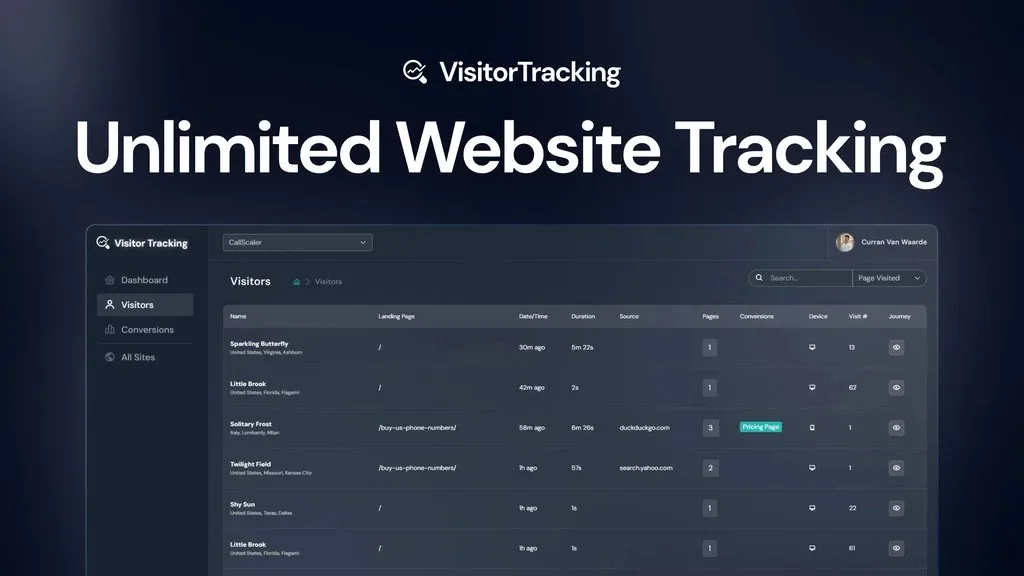
You want to know which specific button, form, or phone number link is actually driving results, not just which pages get views. Visitor Tracking lets you monitor clicks, form submissions, and calls without adding a separate tool.
What Is Visitor Tracking?
Visitor Tracking is a website analytics tool that shows you not just how many people visit your site, but exactly what they do once they get there. Most analytics tools stop at the page level, telling you which pages got views and where traffic came from. That leaves a blind spot around the specific elements on a page, like a pricing button, a contact form, or a phone number link, that actually drive conversions.
Visitor Tracking closes that gap. It combines session tracking, conversion tracking, and event tracking in one dashboard, so you can trace a visitor from their first click all the way to a completed action. Instead of guessing why a page underperforms, you can see precisely which button or form is working and which one is losing people.
How Visitor Tracking Works
Session Tracking
Every visitor session is captured in a live stream, showing location, session duration, pages visited, device, and traffic source. This gives you a real-time view of what is actually happening on your site instead of a delayed summary report.
Event Tracking
Event tracking captures clicks, form submissions, click-to-call actions, and hover behavior, all using the same lightweight tracking code already installed for session tracking. This means you can pinpoint exactly which element on a page is getting engagement without installing a separate click-tracking or heatmap tool. It is especially useful for lead generation pages, service business sites with call-to-action buttons, or forms where drop-off is hard to explain from pageview data alone.
Conversion Tracking
Conversions can be tracked by page, by event, or through full funnel tracking, with breakdowns by source, page, device, and UTM parameters. Because event data and conversion data live in the same dashboard, you can connect a specific click directly to a completed conversion rather than treating them as separate metrics.
Customer Journey Mapping
Customer journey tracking traces the full path a visitor takes from their first interaction with your site to the moment they convert. This helps you understand which channels and pages are actually responsible for acquiring customers, not just which ones get the most traffic.
Website Portfolio View
If you manage multiple sites or client sites, the portfolio view lets you monitor unlimited websites in one place. You can view stats for the last 24 hours, 7 days, 30 days, or 90 days, filtered by sessions, pageviews, or unique visitors, so trends across each site are easy to spot without building manual reports.
Customer Reviews
Visitor Tracking holds an average rating of 4.8 out of 5 based on 356 reviews. Customers highlight its ease of use, real-time insights, and effective conversion tracking, with some noting minor glitches and limitations in data management and tracking accuracy.
Who Should Use It
- Agencies running multiple client websites who need one dashboard to show traffic and conversion results across all of them
- Site owners running lead generation pages who need to know which specific button, form, or phone link visitors actually engage with
- Marketers trying to trace how a customer originally found the business, not just which page they landed on last
- Businesses currently piecing together separate tools for pageviews, click tracking, and conversion tracking who want it in one place
Things to Know Before Buying
- Plans are differentiated by monthly pageview limits, so higher-traffic sites will need a higher tier even though website count is unlimited on every plan
- Exceeding your plan’s pageview limit pauses tracking until the next month unless you upgrade
- Extra user seats for team members or clients are limited on lower plans and only unlimited on higher tiers
- Setup requires adding a tracking code snippet to your site’s header, so some technical comfort or help from a developer may be needed
Frequently Asked Questions
Does Visitor Tracking replace tools like Google Analytics?
It is positioned as an alternative to tools like Google Analytics, Hotjar, and Mixpanel, combining session tracking, conversion tracking, and event tracking in one dashboard instead of requiring multiple tools.
Can I track more than one website?
Yes. Every plan includes unlimited websites, with a website portfolio view that lets you see traffic and conversion trends across all your sites at once.
Does it slow down my website?
The tracking code is built to be lightweight so it does not add noticeable load time to your site while still capturing session, event, and conversion data.
How much does Visitor Tracking cost?
See the Lifetime Deal Details page for current pricing and plan options.
Related products
-

Rybbit: Simple Analytics Without the Complexity
Web Analytics ToolsView Lifetime Deal DetailsRybbit gives you a Google Analytics alternative that actually makes sense at a glance. Track traffic, funnels, and user journeys without wading through confusing menus.
-
Measuremate: Automate GA4, GTM & BigQuery Tracking
Web Analytics ToolsView Lifetime Deal DetailsMeasuremate brings GA4, GTM, BigQuery, and behavioral tools like Hotjar and Microsoft Clarity into a single no-code workflow. Stop stitching together separate tools to understand what your data really means.
-

Publytics
Web Analytics ToolsView Lifetime Deal DetailsPublisher analytics platform replacing GA4’s overwhelming nested menus and cookie consent tracking losses with a one-page dashboard showing the 8 metrics content teams actually check daily, tracking 100% of visitors without consent banners that silently erase 15-30% of your measurable audience.














