TL;DR Summary:
Knowledge Graph Defined: Massive database powering Google search with connected entities, nodes, edges, and attributes for instant factual displays like company details.Search Enhancement: Uses semantic understanding from trusted sources to show knowledge panels, delivering quick answers and rich results without site clicks.Optimization Essentials: Implement schema markup, claim panels, build consistent profiles on Wikipedia and LinkedIn, plus monitor technical health for better visibility.What is Google Knowledge Graph and How Does It Work?
Google’s Knowledge Graph is a massive database that Google uses to display factual information directly in search results. This system helps users get quick answers without clicking through to websites. The database contains information about businesses, people, places, and other entities that Google considers important or useful.
When you search for a famous company like Apple, you see information boxes on the right side of your search results. These boxes show details like founding dates, key people, and contact information. This information comes from the Google Knowledge Graph.
Understanding Google Knowledge Graph Components
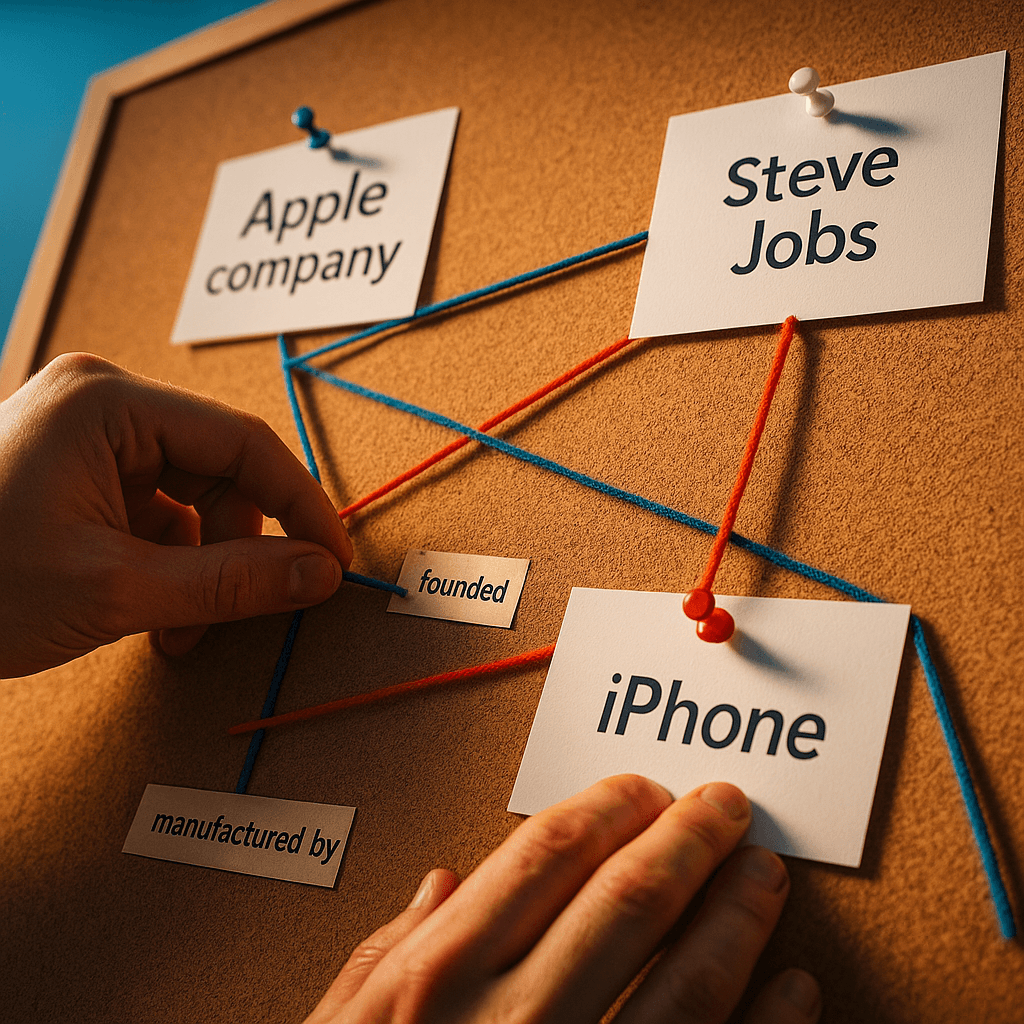
The Google Knowledge Graph works like a complex web of connected information. It has three main parts that work together to organize and display data.
Nodes represent individual entities in the system. Each business, person, or place gets its own unique identifier. This prevents confusion between entities that share names. For example, Apple the technology company has a different node than apple the fruit.
Edges connect these nodes and show relationships between entities. An edge might connect Steve Jobs to Apple with the label “founded.” Another edge connects the iPhone to Apple with the label “manufactured by.”
Attributes provide specific details about each entity. For Apple, attributes include the company’s official name, founding date, headquarters location, and contact information.
How Google Knowledge Graph Powers Search Results
Google builds its Knowledge Graph by gathering information from trusted sources like Wikipedia, licensed databases, and content submitted directly by businesses. The system processes this information and stores it in an organized format.
When someone searches, Google analyzes the query to understand what entity the person wants to learn about. The system then pulls relevant information from the Knowledge Graph and displays it in the search results.
Google uses semantic search to understand the meaning behind search queries. If you search “when was the iPhone company born,” Google understands you want Apple’s founding date. You don’t need to use exact terms for Google to figure out your intent.
Google Knowledge Graph vs Knowledge Panels
The Google Knowledge Graph is the database itself. Knowledge panels are the information boxes that appear in search results using data from that database.
Knowledge panels often include information from multiple sources beyond the Knowledge Graph. A knowledge panel for Steve Jobs might show his birth date from the Knowledge Graph, plus images from Google Images and videos from YouTube.
These panels only appear when Google’s algorithm decides they would help users. Not every search triggers a knowledge panel, and not every business gets one.
Why Google Knowledge Graph Optimization Matters
Optimizing for the Google Knowledge Graph increases your chances of accurate representation in both traditional search and AI-powered features. Google’s Gemini AI model uses Knowledge Graph data for training, which means your representation in the database affects how AI systems discuss your business.
Knowledge panels can drive significant benefits for your business. They provide direct links to your website, increase brand awareness, and make your company appear more established and trustworthy. The panels also help you control your online reputation by ensuring accurate information appears prominently.
Your ability to get a knowledge panel depends largely on your business’s prominence and the quality of information available about your company online. While there’s no guarantee you’ll get a panel, following optimization best practices increases your chances.
How to Claim Your Knowledge Panel
Start by checking if your business already has a knowledge panel. Search for your company name and related terms in Google. If you find a panel about your business, you can claim it to gain some control over the information displayed.
To claim a knowledge panel, perform the search that triggers it, then click the three dots in the panel and select “Claim this knowledge panel.” Google will guide you through their verification process.
Once you’ve claimed your panel, you can suggest edits to incorrect information. Click “Suggest an edit” in the panel, then select the flag icon next to the section you want to change. Provide detailed, accurate information in your submission. Google reviews all suggestions before making changes.
Getting Featured on Knowledge Graph Source Sites
The Google Knowledge Graph pulls information from specific high-authority websites. Getting featured on these sites improves your chances of inclusion in the database.
Wikipedia remains one of the most important sources. Your business must meet Wikipedia’s notability guidelines to qualify for a page. If you qualify, follow Wikipedia’s guidelines for creating new pages or improving existing ones.
LinkedIn and Facebook provide easier entry points. Create complete business profiles on both platforms. Keep your information updated and encourage customer engagement through reviews and posts.
Focus on building your online presence across multiple platforms. List your business in high-quality directories and keep all profiles current. Encourage customers to leave reviews and respond appropriately to feedback. Engage in digital PR to get coverage on authoritative websites. Build links from other reputable sites to your website.
Technical SEO Health for Knowledge Graph Success
Your website’s technical foundation directly impacts Google’s ability to understand your business information. Technical problems can prevent Google from crawling and indexing the structured data that feeds into the Knowledge Graph.
Monitor critical technical factors including page loading speed, mobile compatibility, and crawlability issues. These problems can block Google from accessing the entity information you’ve carefully structured on your site.
Screpy provides automated monitoring for these technical issues, sending alerts when problems occur that could affect your Knowledge Graph optimization. The platform tracks Core Web Vitals, uptime, and other performance metrics that influence how search engines process your content.
Implementing Structured Data for Organizations
Structured data helps Google understand specific information about your business by tagging important details on your website. Organization schema markup is the most common approach for businesses.
Organization schema lets you tag key information like your company name, logo, address, and contact details. Here’s what basic schema markup looks like:
“`json
{
“@context”: “http://schema.org”,
“@type”: “Corporation”,
“name”: “Your Company Name”,
“description”: “Brief company description”,
“logo”: “https://yoursite.com/logo.jpg”,
“email”: “mailto:contact@yourcompany.com”,
“telephone”: “+1-555-123-4567”,
“url”: “https://yourcompany.com”
}
“`
This markup makes it easier for Google to identify and understand your business information. The clearer your markup, the better chance Google has of including accurate details in its Knowledge Graph.
You need to validate your structured data implementation regularly. Screpy offers real-time structured data testing that highlights schema errors preventing Google from properly understanding your entity information.
Setting Up Google Business Profile
Google Business Profile provides another direct channel for submitting your business information to Google. This free tool lets you create and manage how your business appears in Google Search and Maps.
Your Business Profile includes information specifically relevant to local customers: operating hours, popular visit times, customer reviews, and location details. This information complements what Google stores in its Knowledge Graph about your business.
Keep your Google Business Profile information current and complete. Regular updates signal to Google that your business is active and the information is reliable. This consistency across your website, Business Profile, and other online listings strengthens Google’s confidence in your entity data.
Monitoring Your Knowledge Graph Presence
Track how your optimization efforts affect your visibility in knowledge panels and AI-generated content. Regular monitoring helps you identify when your business appears in these features and whether the information displayed is accurate.
Use position tracking tools to monitor when your business triggers knowledge panels for relevant searches. Set up alerts for brand mentions in AI-powered search features as these become more prominent.
Screpy consolidates this monitoring into a single dashboard, tracking your keyword rankings, technical health, and structured data status together. This unified approach helps you see how technical improvements support your Knowledge Graph optimization goals.
Optimizing for the Google Knowledge Graph requires consistent attention to structured data, online presence, and technical website health. The database increasingly influences how businesses appear in both traditional search results and AI-powered features. Screpy helps you maintain the technical foundation and structured data accuracy that Knowledge Graph optimization demands.